The leading case management software for full service firms
Automate your matters, documents, time entries, and billing on a single, AI-powered cloud platform so your firm can reduce leakage and write-downs and maximize profitability.







Empower your full service firm to operate like a sophisticated business
Streamline high-volume casework by automating non-billable tasks and centralizing data into one platform.

A deep Outlook integration streamlines administrative tasks and billable time from anywhere
Tasks are auto-assigned to the right roles
Clarity on who’s working each case, and what needs to be done
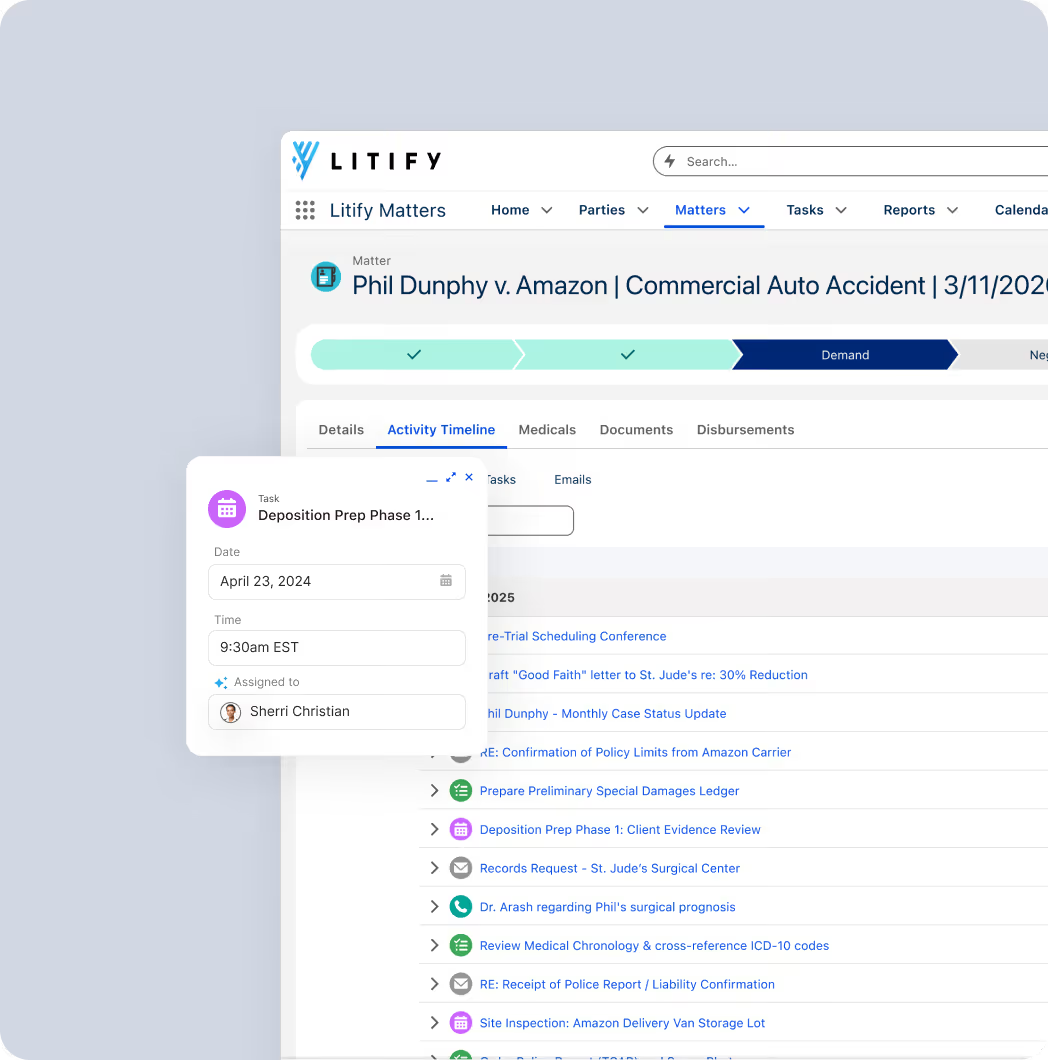
Automated time capture and invoice reviews reduce errors, while direct pre-bill reviews ensure faster payments.
Prompt staff to enter time when completing billable work
Client guidelines are automatically applied to each case
Enable attorneys to review pre-bills directly from the matter

Use real-time insights to justify rates based on performance and improve your panel position.
Leverage historical case data to make more accurate projections
Create a 360° view of every relationship to tailor your strategies
Every piece of data is captured and organized for real-time, no-code reporting
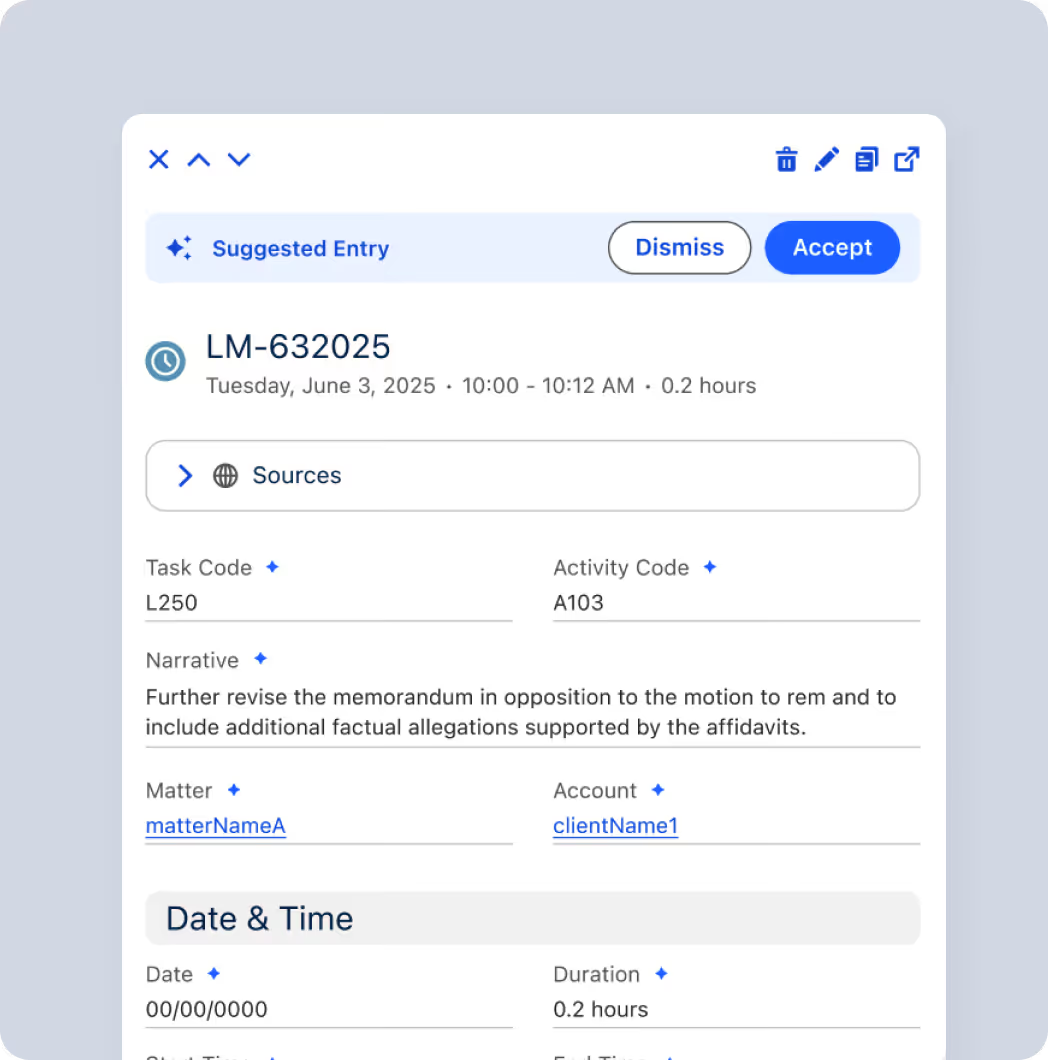
Flow from insight to action by using AI to surface data, accelerate workflows, and enhance decision-making.
Intelligent matter summaries, document drafts, and performance insights
Suggest missed time entries and automatically enter time entries based on the latest actions
Process, summarize, and analyze transcripts from court proceedings and depositions.
Integrated with your favorite tools





“We’ve definitely seen write-downs come down over the last year, and we’ve also seen an increase in our time capture because of the automation and tools we’ve implemented that constantly remind our staff to bill their time.”
Scalable Software To Support Firm Growth And Profitability

Key features built for
full service firms

Conflict Check Agent
Don’t waste time on impossible cases. Automatically check for conflicts against your full database of clients before accepting a case.

Matter Management
Standardize and automate your unique best practices across all the matters your team handles, including patents, IP, real estate, litigation, and more.

LitifyAI Ask & Draft
Ask anything of your documents and data, from a single file to your entire firm history, to draft, edit, and automate work using centralized, firm-wide AI prompts.

Automated Time Capture
Provide timekeepers with multiple ways to track and capture time, including traditional timers, batch time entries, calendar view, and AI-suggested time entries.

Email & Calendar Sync
Integrate your workspaces into one. Easily save and update emails, events, deadlines, and sensitive documents between Litify and Outlook.

LitifyAI Summarize
Process, summarize, and analyze transcripts from court proceedings and depositions.

LitifyAI Medical Chronology
Generate accurate, source‑linked medical chronologies and organize medical encounters and bills into a reconciled ledger.

Robust Billing
Allow timekeepers and billing staff to collaborate on pre-bills and invoices in one platform. Automated billing rules spot violations before they are sent to the client.

Mass Bill Generation
Run multiple billing jobs simultaneously or schedule them for off-hours to handle heavy workloads without slowing down your daily operations.

Payment Applications
Gain precise control over payment allocation toward your invoices, including partial payments and allocating funds across multiple invoices to write off entire invoices or specific line items.

Refunds
Create, track, and manage refunds for payments while ensuring refunds don’t exceed the original payment amount or available unapplied balance to maintain accurate financial records.

Reports & Dashboards
Visualize case progress, time on desk, billing realization, and other key performance indicators with personalized reports and dashboards in a user-friendly interface.
Frequently Asked Questions
Couldn’t find what you were looking for?
Contact us at
A: Litify centralizes CRM, matters, billing, timekeeping, and documents across every practice group so firms can manage all work streams in a unified system without juggling disconnected tools.
A: Yes. Automated time capture and streamlined workflows reduce non-billable work, helping attorneys spend more time on revenue-generating activities.
A: Yes. Litify’s architecture supports rapid expansion for new practice groups, offices, workflows, and users can be added easily as the firm grows.
A: Dynamic dashboards give leadership visibility into utilization, billable hours, profitability, matter progress, and conversion trends across all practice areas.
A: By automating repetitive work, capturing more billable time, reducing write-downs, and providing data insights that help optimize staffing and workflows.
A: Yes. Workflows, templates, approval chains, and matter plans can usually be tailored to match each practice area’s unique needs.
A: Most solutions include time tracking prompts, automated entries, billing rules, and invoice verification tools to reduce errors and speed up billing cycles.
A: Firms can monitor utilization, matter progress, attorney performance, financial KPIs, and client trends through dashboards and real-time reports.
A: By automating routine tasks, reducing administrative load, centralizing information, and eliminating the need for multiple disconnected systems.
Need to learn more before securing your demo?
Here are some popular resources designed to help enterprise legal teams drive efficiency, visibility, and value.